

When you're hunting for the best website builder for your online store, you'll quickly see a few names pop up again and again: Shopify, Wix, BigCommerce, and Squarespace. They're all leaders for a reason. Shopify is the undisputed champ for serious e-commerce, Wix gives creative brands total design control, BigCommerce is built for businesses ready to scale, and Squarespace is perfect for anyone selling art, services, or design-forward products.
How To Choose Your E-commerce Website Builder
Let's be honest, picking a platform for your online store feels like a huge decision. It's more than just choosing a pretty design; you're selecting a partner that will process your payments, track your inventory, and ultimately, help you make money. Get it right, and you've got a solid foundation for growth. Get it wrong, and you're in for a world of headaches and a painful migration down the road.
Think about it this way: a powerful, sales-focused platform like Shopify is like buying a pre-built, commercial-grade kitchen. It’s designed for one thing—selling—and it does it incredibly well. On the other hand, a flexible builder like Wix is more like a modular workshop; you can arrange the tools and space exactly how you want, giving you complete creative freedom over your brand’s look and feel.
Key Factors to Consider Early On
Before you get lost comparing every last feature, take a step back and think about your own business. A little self-awareness now will save you a ton of time and help you avoid picking a platform you’ll outgrow in six months.
Ask yourself these three core questions:
- What am I actually selling? Physical goods have different needs than digital downloads, subscriptions, or appointment-based services. The right platform will feel natural for your specific business model.
- How tech-savvy am I? Be real with yourself. If the thought of code makes you sweat, a drag-and-drop editor is your best friend. If you’re comfortable tinkering, you might want more customization power.
- Where is this business going? Are you planning to sell a handful of handmade items, or are you aiming for a global empire with thousands of products? Your platform needs to handle your ambition.
Just look at the dashboard of a builder like Wix. It’s built to feel intuitive from the moment you log in.
This kind of clean, visual-first approach is exactly why it appeals to entrepreneurs who want to get hands-on with their brand's identity without needing a developer.
Top Online Store Builders At a Glance
To cut through the noise, I’ve put together this quick-reference table. Think of it as a cheat sheet to match your business type with the right platform right from the start.
Here's a breakdown of where each of the top players shines.
| Platform | Best For | Key Feature |
|---|---|---|
| Shopify | Dedicated E-commerce at Any Scale | Robust, all-in-one sales tools and app ecosystem. |
| Wix | Creative Entrepreneurs & Small Businesses | Unmatched drag-and-drop design flexibility. |
| BigCommerce | High-Growth & B2B Stores | Advanced built-in features with zero transaction fees. |
| Squarespace | Artists, Designers & Service-Based Sellers | Industry-leading template design and aesthetics. |
This table gives you a starting point, helping you narrow down your options to the one or two platforms that truly align with what you're trying to build.
Speaking of market leaders, Wix has carved out a massive slice of the website builder pie. For e-commerce stores specifically, it's a major contender, commanding 21% of the market in the US and 22% in the UK, putting it right up there with Shopify. You can dig deeper into these numbers and what they mean by checking out these insights on website builder market share.
Comparing Core E-commerce Functionality
An online store is so much more than a pretty digital storefront; it’s a complex machine running behind the scenes. While a stunning design is what first grabs a customer's attention, the real work is in the operations. This is where the best website builders for online stores prove their worth—or reveal their weaknesses. We’re going to look past the marketing fluff and compare how these platforms handle the absolute non-negotiables of running an e-commerce business.
We’ll get into the engine room of your store, focusing on three mission-critical areas: payment processing, inventory management, and shipping. Digging into the subtle differences here is what will ultimately tell you which platform has the right operational backbone for your specific business, whether you're selling handmade jewelry from your living room or managing a massive warehouse.
Payments, Gateways, And Those Pesky Fees
Let's start with the most important part: getting paid. How a platform handles payments directly hits your bottom line and shapes the customer checkout experience. It's not just about accepting credit cards; it's about the fees, the flexibility you have, and how smooth the process is for your buyers.
Shopify, for instance, really wants you to use its built-in Shopify Payments. It's a fantastic, seamless integration that simplifies your setup and offers competitive rates. The catch? If you decide to use an external gateway like Stripe or PayPal, Shopify adds its own transaction fee on top of what the processor already charges. This fee can range from 0.5% to 2%, depending on your plan, which can be a deal-breaker for businesses with thin margins.
On the other hand, platforms like BigCommerce and Wix don't charge their own transaction fees. This is a huge deal. It gives you the freedom to choose from dozens of payment processors without getting penalized, which is a major win if you want maximum flexibility or already have a great rate with a specific provider.
Key Takeaway: If you're happy using Shopify Payments, the experience is incredibly smooth. But if you need or want to use a different payment gateway, BigCommerce or Wix will almost always be the more cost-effective choice because they don't tack on those extra platform fees.
Squarespace also provides a clean payment setup, integrating directly with Stripe, PayPal, and Square. Similar to Shopify, it drops its own transaction fees once you upgrade to their Commerce plans, which is a nice perk for growing stores.
This chart really puts the market into perspective, showing just how much of the hosted e-commerce space is dominated by a few key players.
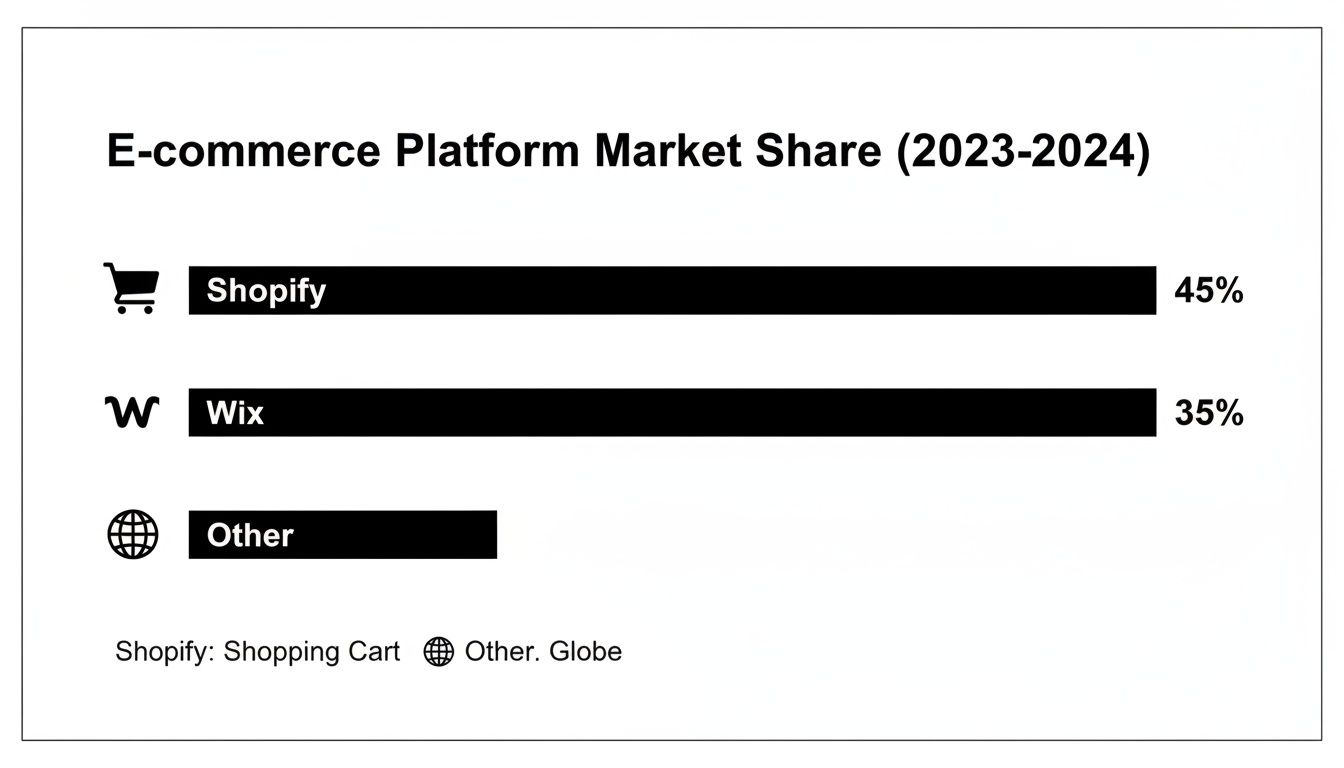
It’s clear that while Shopify is an absolute giant, Wix has carved out a massive piece of the pie for itself, proving that its e-commerce tools are a legitimate and powerful alternative for a huge number of entrepreneurs.
To make these differences clearer, let's break down how the top platforms handle the core e-commerce functions side-by-side.
Detailed E-commerce Feature Comparison
| Feature | Shopify | Wix | BigCommerce | Squarespace |
|---|---|---|---|---|
| Payments | Pushes native Shopify Payments. Charges extra 0.5%-2% fee for external gateways. | No extra transaction fees. Huge selection of third-party gateways. | No extra transaction fees. Excellent for choosing your own payment processor. | No extra fees on Commerce plans. Integrates with Stripe, PayPal, Square. |
| Inventory | Excellent built-in system. Up to 100 variants per product. Great for most stores. | Solid for simple inventories. Can get clunky with many complex products. | Industry-leading. Up to 600 variants. Best for complex catalogs. | Good for basic needs. Best for stores with straightforward product lines. |
| Shipping | Best-in-class Shopify Shipping with deep carrier discounts. Very streamlined. | Good native tools for flat rates and weight-based rules. Relies on apps for advanced logic. | Displays real-time carrier rates on all plans. Integrates with ShipStation. | Simple, effective tools for basic shipping setups. May need apps for scaling. |
This table highlights a crucial point: the "best" platform really depends on your specific operational needs. A store with a massive, complex product catalog will feel right at home on BigCommerce, while a startup looking for the easiest path to discounted shipping labels will love Shopify.
Inventory Management And Product Variants
Good inventory management is what separates a smooth-sailing business from a logistical headache. This is one area where the dedicated e-commerce platforms, like Shopify and BigCommerce, really pull away from the general-purpose website builders.
Both Shopify and BigCommerce come equipped with powerful, built-in systems for tracking stock levels, even across multiple warehouses. They handle low-stock alerts and purchase orders like pros, and they're built to manage complex product catalogs without breaking a sweat.
Let's imagine you sell t-shirts. Here’s a practical look at how the platforms handle product options:
- Shopify: You get up to 3 options (like Size, Color, Material) and a total of 100 variants per product. For the vast majority of businesses, this is plenty.
- BigCommerce: This is where it really flexes. It allows up to 250 product options and a staggering 600 variants right out of the box. If you sell highly customizable products—think engraved gifts or specialty auto parts—BigCommerce is in a league of its own.
- Wix & Squarespace: Both offer decent variant management, but it's not as deep. They're perfect for simpler inventories but can start to feel clunky if you have hundreds of SKUs with lots of different combinations.
If you have big plans to scale your product line, BigCommerce’s built-in power is a serious advantage that could save you from relying on expensive third-party apps later on.
Shipping And Fulfillment Logistics
Shipping can easily make or break your customers' experience. The top website builders for online stores know this, and they simplify this notoriously complex process with integrated tools for calculating rates, printing labels, and managing fulfillment.
Shopify absolutely nails this with Shopify Shipping. It gives you access to pre-negotiated, discounted rates with major carriers like USPS, UPS, and DHL. For a small business, this feature alone can translate into huge savings in both time and money. It also smartly integrates with multi-location inventory, letting you fulfill orders from the closest warehouse.
BigCommerce tackles this differently. While it doesn't have a native shipping service like Shopify, its superpower is its ability to display real-time carrier rates at checkout on all of its plans—a feature often locked behind expensive tiers on other platforms. That kind of price transparency for customers is a massive conversion booster.
Wix and Squarespace offer reliable, straightforward shipping tools. You can easily set up flat rates, free shipping thresholds, and rules based on weight. They are perfectly capable for most businesses, but you'll likely need to turn to their app stores for more advanced needs like international customs forms or complex, real-time rate calculations.
Evaluating Design Flexibility and User Experience
Think of your website's design as its digital curb appeal. It’s the first impression, the window display, and the friendly greeting all wrapped into one. A clunky or confusing site doesn't just look unprofessional; it actively scares potential customers away. In fact, a staggering 75% of consumers admit they judge a company's credibility based on its website design alone. This is one area where the top website builders really show their differences.
The choice boils down to a fundamental philosophy. Do you want a structured, theme-based system that guides you toward a proven, high-converting layout? Or do you crave a freeform, drag-and-drop canvas that gives you total creative control? There's no right or wrong answer here—it all depends on your brand's personality, your comfort with design, and how much you want to tinker.

Let's break down how each platform helps you build a beautiful store that turns casual visitors into loyal fans.
The Drag-and-Drop Editor Showdown
When you think of pure, unadulterated creative freedom, Wix immediately comes to mind. Its unstructured drag-and-drop editor is a designer's playground. You can literally place any element anywhere on the page, down to the last pixel. This is a game-changer if you have a powerful visual brand and want to build a site that completely shatters the typical e-commerce template.
Of course, with great power comes great responsibility. This level of freedom also makes it incredibly easy to create a cluttered, inconsistent, or just plain confusing layout if you don't have a good eye for design. It’s perfect for the business owner who wants the final say on every single visual detail.
On the other end of the spectrum is Shopify. It uses a more structured, theme-based system. You pick a professionally designed template and then customize pre-built sections within that framework. These "guardrails" are there for a reason: they make sure your store stays polished, mobile-friendly, and easy for customers to navigate, even if you’ve never designed a webpage in your life. It’s less about building from scratch and more about perfecting a proven formula for selling.
Template Quality and Customization
The out-of-the-box quality of a platform's themes can make or break your site's look. This is where Squarespace has carved out its reputation. Known for its award-winning, design-forward templates, Squarespace is the undisputed champion for brands where aesthetics are everything—think photographers, artists, and high-end lifestyle brands. Their themes are modern, clean, and absolutely stunning from the moment you install them.
While you don't get the same free-for-all drag-and-drop as Wix, Squarespace offers incredible customization within its structured editor. You can fine-tune fonts, color palettes, and page layouts to make the site truly your own, all while maintaining that professional, cohesive feel. It really hits that sweet spot between guided design and creative expression.
Key Insight: Think of it this way: Shopify’s themes are engineered for conversion, Squarespace’s themes are crafted for aesthetics, and Wix gives you a blank canvas. Your choice really depends on what you’re trying to achieve—selling efficiency, brand storytelling, or total creative control.
Here’s how that plays out for a founder customizing their homepage:
- On Wix: You could be layering text over a video background, creating overlapping image galleries, and adding custom animations to buttons—all without writing a single line of code.
- On Shopify: You'd be adding a "Featured Collection" section, tweaking its background color, and choosing to display products in a two- or three-column grid, all using the theme’s built-in options.
- On Squarespace: You might choose a bold new layout for your header, apply a curated color palette across the entire site, and use its elegant grid system to artfully arrange your product photos.
Mobile Experience and Responsiveness
In 2024, designing for mobile isn't just a good idea; it's non-negotiable. With mobile commerce expected to make up over 44% of all e-commerce sales, a flawless experience on smartphones is essential. While all the major platforms create responsive sites, they get there in different ways.
Shopify and Squarespace take an automated approach, generating a beautiful mobile version of your site from your desktop design. This is super efficient and guarantees a consistent, user-friendly experience across all devices.
Wix, staying true to form, gives you a completely separate mobile editor. This offers an incredible amount of control to fine-tune the mobile view independently of the desktop version. The downside? You now have two separate designs to manage and check. For most busy store owners, the automated approach is faster, safer, and far more reliable.
Diving into App Ecosystems: Your Secret to Scaling
Let's be real: no ecommerce platform does everything perfectly right out of the box. Think of your website builder as the foundation of a house. It’s solid, it’s essential, but you still need to add the plumbing, wiring, and furniture to make it a home. For your online store, those critical additions are apps and integrations.
Your ability to grow and adapt hinges on the platform's app ecosystem. A great app marketplace lets you plug in specialized tools for everything—from sophisticated email marketing and SEO analysis to complex inventory management and top-tier customer support. Without a healthy ecosystem, you’ll eventually hit a wall, unable to add the features you need to compete.
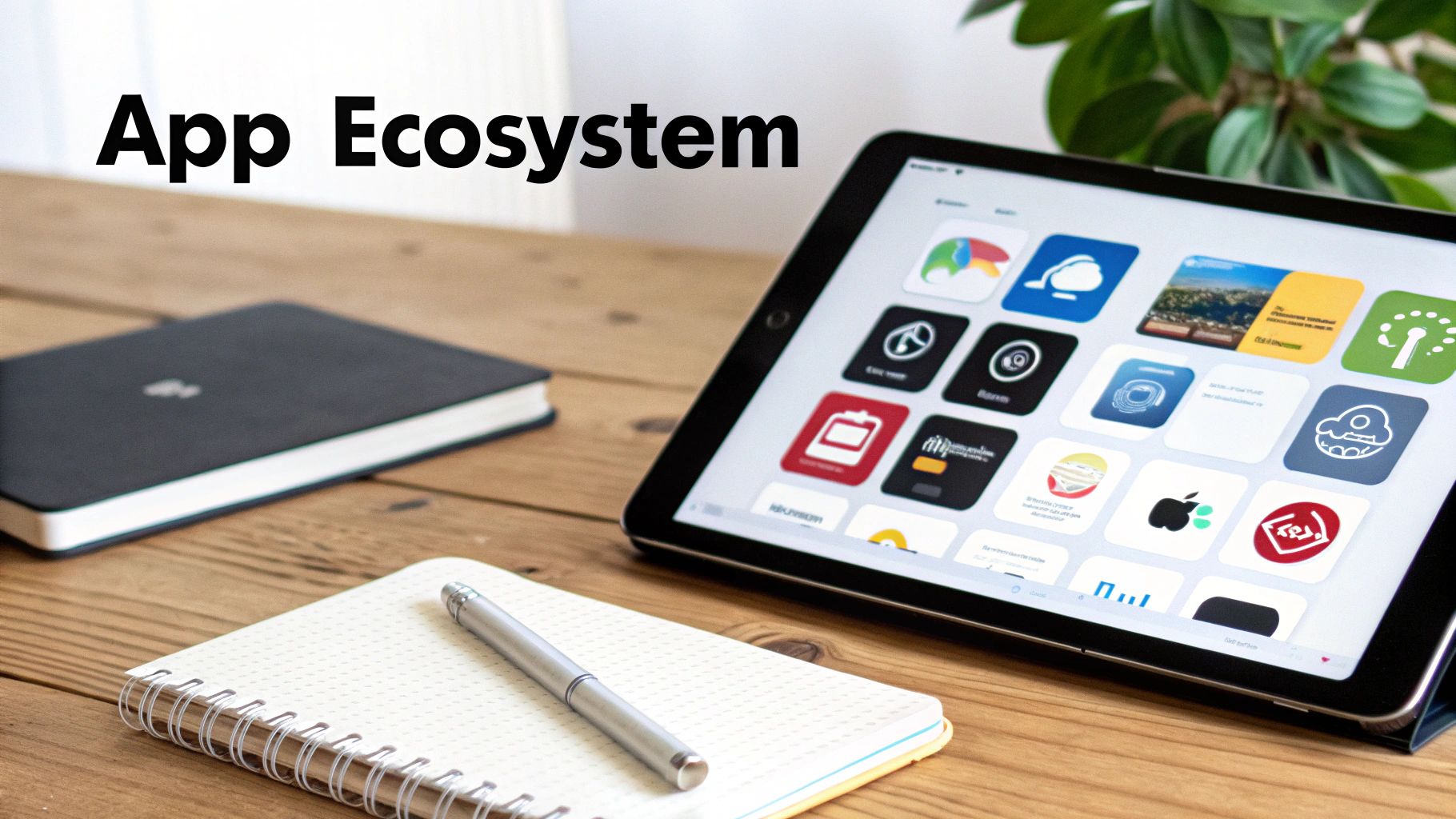
Let's break down the app marketplaces of the top platforms to see which one gives you the best toolkit for future growth.
Shopify: The Undisputed App King
When it comes to the sheer volume and variety of apps, the Shopify App Store is in a league of its own. With over 8,000 apps, it's the largest and most mature ecommerce ecosystem out there, and it’s not even close. If you can dream up a feature, there's a very good chance an app already exists for it.
This massive selection is Shopify’s superpower. Need a killer customer loyalty program? You’ve got great options like LoyaltyLion or Smile.io. Want to add product subscriptions? Apps like ReCharge and Bold Subscriptions are ready to go. This depth means your store can evolve right alongside your business.
But this strength comes with a catch. Many features that are standard on other platforms require a paid app on Shopify. This "app-dependency" can sneak up on you, and your monthly bill can climb fast. Many of the best apps have their own subscription fees, often ranging from $10 to over $100 per month.
BigCommerce: Built-In Power with Purposeful Integrations
BigCommerce plays the game differently. Their philosophy is to pack as much core functionality into the platform as possible, so you rely less on third-party apps. Things like advanced product filtering, multi-currency selling, and real-time shipping quotes are often built right in—features that would cost you extra on Shopify.
This makes BigCommerce a beast straight out of the box, especially for stores with complex operational needs. Its app marketplace is smaller but carefully curated, focusing on high-quality integrations with major business software like ERPs (Enterprise Resource Planning), PIMs (Product Information Management), and sophisticated logistics tools.
Key Difference: Shopify gives you ultimate flexibility with an app for everything, but at a potentially higher cost. BigCommerce provides more muscle natively, using its app store for specialized, enterprise-grade integrations.
For example, a fast-growing brand that needs to sync its store with a huge inventory system like NetSuite will find BigCommerce’s architecture and pre-vetted apps are a perfect match. The focus is less on small, trendy features and more on deep, mission-critical connections.
Wix and Squarespace: Growing Ecosystems for Small Businesses
Both Wix and Squarespace have been hustling to expand their app offerings, and they’ve made some impressive progress. Each now offers hundreds of apps covering the essentials for most small to medium-sized businesses.
- Wix App Market: You’ll find a solid set of tools for marketing (Wix Email Marketing), appointments (Wix Bookings), and customer engagement. A lot of the best apps are developed in-house, which means they work seamlessly.
- Squarespace Extensions: This is a more curated list of third-party tools focused on shipping (ShipStation), accounting (Xero), and print-on-demand services. The selection is smaller, but it’s all about quality over quantity.
While their ecosystems are more than enough for many businesses, they just don't have the depth or specialized tools you’ll find on Shopify or BigCommerce. If your business model relies on a niche feature or you anticipate needing very specific integrations down the road, you might outgrow their app stores.
Ultimately, picking the right platform means looking past today's features and thinking about tomorrow's potential. A thriving app ecosystem is a sign that a platform can grow with you, ensuring you're never held back by technology.
That $29 per month price tag you see on a website builder’s homepage? Think of it as the base model of a car. It’ll get you on the road, but it’s far from the total cost of ownership. The real price of running your online store is a mix of that monthly fee, transaction charges, critical app subscriptions, and even your website's theme.
These costs aren't set in stone; they'll change as your business grows. What feels like a bargain when you're just starting out can quickly become a major expense as you scale. Getting a handle on this financial journey from day one is key to picking a platform that will grow with you, not hold you back.
Take a look at Shopify on top of what the payment processor is already charging you. On the flip side, BigCommerce famously charges zero platform transaction fees, which gives you the freedom to pick your gateway without getting penalized.
-
App Subscriptions: Let's be real: no single platform does everything perfectly out of the box. You'll almost certainly need apps for things like loyalty programs, product subscriptions, or better email marketing. Those monthly app costs can sneak up on you, easily turning a $39/month plan into a $150/month reality.
-
Theme and Design Costs: Sure, you can start with a free theme. But most brands eventually invest in a premium one for a sharper design and more features. That’s usually a one-time cost, but it can run anywhere from $180 to $350.
Cost Scenarios for Different Business Stages
To bring this all to life, let’s run the numbers for three different types of businesses.
Scenario 1: The Startup on a Budget
Imagine a new store pulling in about $2,000/month. The main goal here is to keep costs down while you get your feet under you.
- Squarespace or Wix: With plans around $27/month, these two offer incredible value. Once you're on their commerce plans, the transaction fees vanish, and they have so many built-in tools for marketing and scheduling that you won't need many paid apps to start. For a new business, this is a financially smart way to get going.
Scenario 2: The Growing Mid-Sized Business
Now picture an established store hitting $15,000/month. At this point, you need more power, and you're starting to really notice those transaction fees eating into your margins.
-
Shopify: The $105/month plan starts to make a lot of sense here. The lower transaction fees begin to cancel out the higher monthly subscription cost. You're probably also spending an extra $50-$100/month on must-have apps for marketing automation and customer support.
-
BigCommerce: Their $105/month "Plus" plan is a direct competitor. The biggest draw is the complete lack of transaction fees and the powerful features that are already built-in (like advanced product filtering), which often require a paid app on Shopify.
Key Insight: For a mid-sized business, the choice between Shopify and BigCommerce often boils down to a simple question: will you spend more on Shopify’s transaction fees and app pile-on, or on the few specialized apps you might need to add to BigCommerce?
Scenario 3: The High-Volume Enterprise
We're talking about a brand processing over $50,000/month. Here, the conversation shifts to scalability, performance, and selling internationally.
At this level, you’re looking at platforms like Shopify Plus (starting around $2,000/month) and BigCommerce Enterprise. The focus is less on the monthly fee and more on the total value—things like dedicated support, much lower payment processing rates, and the power to handle massive traffic spikes during a sale without breaking a sweat. BigCommerce’s headless commerce options are particularly strong here, giving large brands total freedom to build custom storefronts. The price is steep, but you're investing in the infrastructure to support a multi-million dollar business.
So, How Do You Make the Final Call?
You’ve done the hard work. You've weighed the features, crunched the numbers, and peeked under the hood of each platform's design tools. Now comes the moment of truth: picking the right home for your online store. The secret isn't just choosing the most popular name; it's about finding the one that genuinely clicks with your business, your skills, and your vision for the future.
This last step is all about you. By asking a few honest questions about your own business, you can line up your needs with what each builder does best. Suddenly, the perfect choice becomes obvious. Think of it less like a final exam and more like a strategy session to make sure your platform will help you grow, not hold you back.
A Quick Gut Check for Your Business
Before you sign on the dotted line, take a breath and get real about your situation. Your answers here will light the way.
-
What are you actually selling? Are you juggling a warehouse full of physical products with tons of variations? Or are you a dropshipper? Maybe you're selling digital guides or building a subscription box empire. For huge, complex inventories, a powerhouse like BigCommerce is built for the job, while Shopify’s app ecosystem is a dream for dropshipping.
-
How comfortable are you with tech? No judgment here. If you want to drag, drop, and design a stunning site without ever seeing a line of code, Wix is your creative playground. But if you'd rather have a guided, sales-focused setup where the heavy lifting is done for you, Shopify is tough to beat.
-
What does growth look like for you? Is this a weekend passion project, or are you aiming for global domination? You need to know if your platform can handle a sudden spike in sales, manage international shipping, and process different currencies without breaking a sweat.
The real win is finding a platform that doesn't just fix today's problems but is ready for the ones you'll have next year. A builder with a massive app store, like Shopify, lets you bolt on new features as your business gets more complex.
The "If-Then" Guide to Choosing Your Platform
Alright, let's turn those answers into a clear-cut decision. This is where you find your match.
Here’s the simple breakdown:
-
If you need total design freedom to build a unique brand: Go with Wix. Its editor gives you control over every last pixel. It’s perfect for creative business owners who want their site to be a true one-of-a-kind.
-
If you're serious about selling and want to scale effortlessly: Go with Shopify. It's the gold standard for a reason. You get the best all-around sales tools and an unbeatable app store to support you from your first sale to your millionth.
-
If you have a massive product catalog and hate transaction fees: Go with BigCommerce. It’s built to handle huge inventories with tons of SKUs right out of the box. Plus, you can use any payment processor you want without getting hit with extra fees.
-
If your brand's aesthetic is everything: Go with Squarespace. If you're selling art, high-end goods, or anything where looks matter, its gorgeous templates give you a polished, professional vibe from day one.
And there you have it. You've moved from comparing features to making a strategic choice. You’re now ready to pick a platform with confidence and get your store set up for success right from the start.
Got Questions? We’ve Got Answers.
Jumping into the world of e-commerce platforms can feel a bit overwhelming. Everyone has an opinion, and every platform seems to do things a little differently. Let's clear up some of the most common questions founders ask when they're getting started.
Can I Switch My Store to a Different Platform Later?
The short answer is yes, you absolutely can migrate your online store. But—and this is a big but—it's a serious undertaking.
Think of it like moving your entire brick-and-mortar shop to a new location overnight. You have to pack up all your products, customer files, and sales records (exporting data), then unpack and set it all up again in the new space (importing it). While there are tools to help with the heavy lifting, it’s a project that demands careful planning to make sure you don't lose sales or critical data in the process. This is exactly why putting in the research now to pick the right home for your business is time well spent.
Do I Need to Be a Coder to Build an Online Store?
Not at all. This is probably the biggest myth out there. Platforms like Shopify, Wix, and Squarespace were built from the ground up for people who don't code.
They all feature visual, drag-and-drop editors and simple customization panels that let you design a beautiful, professional store without touching a single line of code. Sure, knowing some HTML or CSS can let you do some advanced tinkering down the road, but it is absolutely not a requirement to get started and succeed.
The Big Picture: The whole point of these platforms is to open up entrepreneurship to everyone, not just tech wizards. They give you the power to build and run a real business, no matter your technical skill set. It's a game-changer.
Which Platform Is Genuinely the Best for a Beginner?
This really depends on what kind of "beginner" you are.
If your main goal is to start selling products as quickly and efficiently as possible, my vote goes to Shopify. Its setup process is incredibly guided, the dashboard makes sense right away, and all the tools you need to manage sales are front and center. It's built for commerce, period.
On the other hand, if your priority is creative freedom and you want an easy way to build a visually stunning website, Wix is a fantastic starting point. Its drag-and-drop editor is one of the most intuitive out there, giving you a ton of control over the look and feel from day one.
Ready to turn your idea into a thriving remote business? Remotepreneur offers proven playbooks, real founder stories, and the practical tools you need to build and scale your venture from anywhere. Start your journey today.
