
When you break it down, creating a solid SOP really comes down to three stages: prepare, write, and manage. You start by picking a task that gets done over and over, you write down exactly how to do it step-by-step, and then you park that document somewhere your whole team can find it and keep it fresh. It’s essentially creating a playbook for the core functions of your business.
Why Your Remote Business Needs Clear SOPs
Trying to run a remote business without clear Standard Operating Procedures (SOPs) is like handing your team a bunch of ingredients without a recipe. Sure, you'll get something at the end, but it's going to be a different meal every single time. In a distributed team, you can't just pop your head over a cubicle wall to ask how something's done. SOPs become the glue that holds everything together, ensuring consistency whether you're bringing on a new virtual assistant or managing client projects across continents.
For a remote-first company, this kind of documentation isn't just a "nice-to-have." It’s the bedrock of growth. It gives your team the confidence to work independently because they know they’re following a proven, agreed-upon method. This clarity is what lets you hand off tasks effectively and scale up without constantly fighting fires.
To give you a bird's-eye view, here's a quick breakdown of what the process looks like.
Quick Guide to SOP Creation Phases
| Phase | Key Objective | Example for a Remote Agency |
|---|---|---|
| Prepare | Identify a repetitive process and define its scope and purpose. | Pinpointing the exact steps for onboarding a new client, from initial contact to project kickoff. |
| Write | Document the process clearly with steps, visuals, and necessary details. | Creating a step-by-step guide in a tool like Notion that shows how to set up a client's project in Asana. |
| Manage | Store the SOP in a central location, train the team, and schedule regular reviews. | Saving the final SOP in a shared "Company Wiki" and setting a quarterly calendar reminder to review and update it. |
This table shows that building great SOPs is a structured, repeatable process—not an overwhelming, one-time project.
The Foundation for Remote Scaling
Good SOPs are all about getting that "tribal knowledge"—the crucial info stuck in one person's head—out into the open and turning it into a shared company asset. This is a game-changer for a few reasons:
- Faster Onboarding: New hires can hit the ground running by following detailed guides instead of soaking up hours of one-on-one training time.
- Fewer Mistakes: When everyone follows the same playbook for things like sending invoices or publishing a blog post, errors and inconsistencies just naturally fade away.
- Better Efficiency: Your team stops wasting time reinventing the wheel or hunting for answers. The "how-to" is always just a click away.
- Rock-Solid Consistency: Clients get the same top-notch experience every single time, no matter who on your team is handling their account.
This flowchart lays out the entire workflow in a simple, visual way.
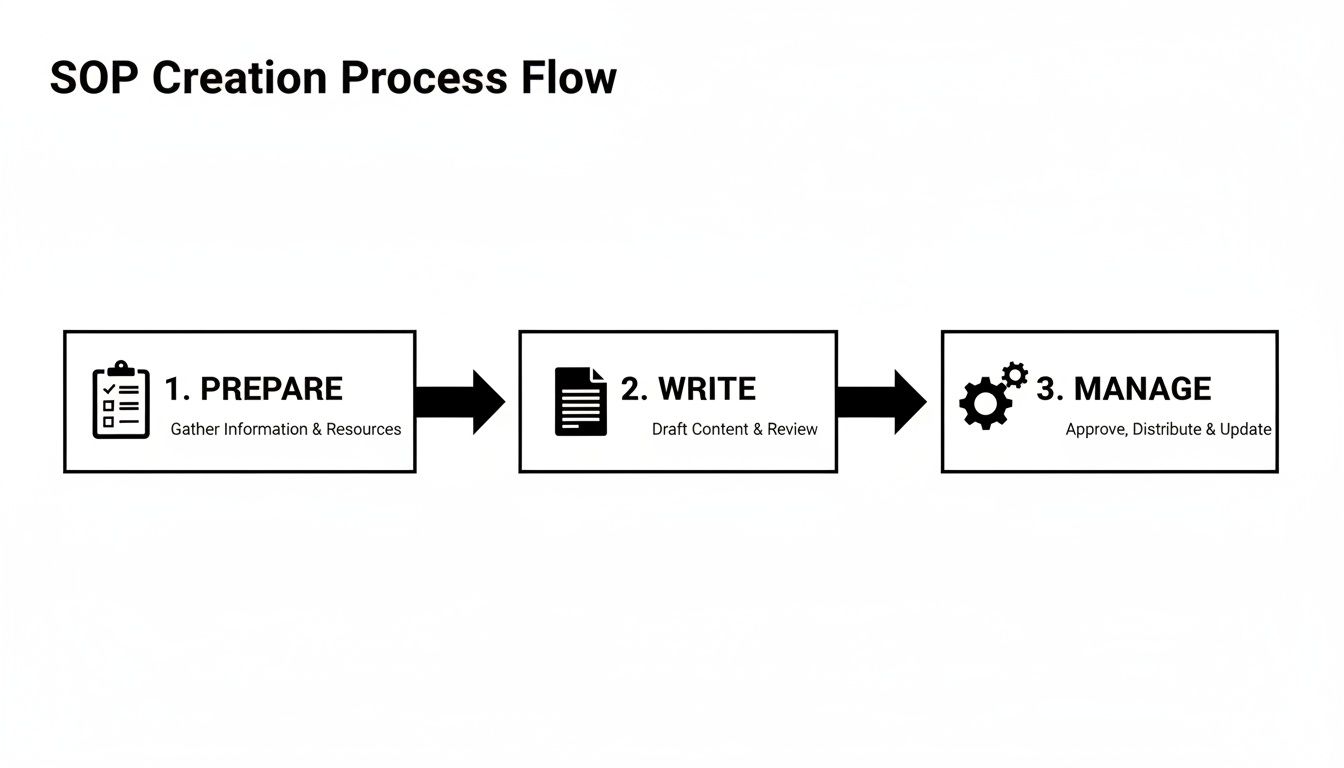
As you can see, it always kicks off with preparation and circles back to ongoing management, which really drives home the point that SOPs are living documents, not "set it and forget it" files.
The Tangible Impact on Your Bottom Line
The perks of documentation aren't just fluffy concepts; they have a real impact on your numbers. The ROI from well-written SOPs is huge for remote businesses. In fact, companies with documented procedures have been shown to cut operational errors by a whopping 40% and speed up new employee onboarding by 50%. For a growing VA agency or an e-commerce store on a platform like Remotepreneur, those kinds of improvements are massive. You can dig into more data on the operational benefits of SOPs.
An SOP isn’t about killing creativity. It’s about building a stable foundation so your team can spend their creative energy on work that matters, not on figuring out the right way to name a file.
At the end of the day, creating SOPs is a direct investment in your company's future. It's the framework that lets you step back from the daily grind to actually steer the ship, knowing your crew has the map they need to get the job done right.
Getting Ready to Document Your First Process
Before you even think about opening a blank document, there’s some groundwork to do. This prep work is what separates an SOP that becomes a team bible from one that just collects digital dust. The goal isn't to boil the ocean and document everything at once. It's about being strategic and starting with the tasks that give you the biggest bang for your buck.
Think about it: what are the questions that pop up in Slack over and over again? Which workflow grinds to a halt if one specific person calls in sick? Those are your gold mines. The first move is to pick one—just one—and get specific. For instance, maybe it's the exact sequence for onboarding a new client at your VA agency. Pinpointing what needs a standard is the first step to cutting down the 40% operational errors that plague businesses without clear processes. You can dig deeper into why standardizing your business operations is a game-changer over at makesopapp.com.
Identify Your High-Impact Processes
Let's be honest, not all processes are created equal. To figure out where to start, ask yourself a few questions. What do we do most often? Where do things usually go wrong? What critical knowledge is trapped in one person's head? The answers will point you directly to your first SOP candidates.
A great way to prioritize is to find that sweet spot where high frequency meets high importance. Start with processes that are:
- Repetitive: Things done daily or weekly, like a social media posting schedule, running payroll, or pulling together client reports.
- Critical: Workflows that are make-or-break for your revenue or client happiness. Think sales outreach or project delivery.
- Complex: Multi-step procedures where one missed detail can cause a major headache, like setting up a new e-commerce product with all its SEO tags and variants.
- Teachable: The tasks you know you'll need to hand off as your remote team expands.
By hitting these areas first, you start clearing bottlenecks and building real operational muscle right away. Your first SOP should solve a real, nagging problem.
Define What Success Looks Like
An SOP without a clear goal is just a recipe with no dish in mind. Before you write a single step, define the end game. What business objective does this process actually serve? A well-defined purpose turns a boring "how-to" guide into a strategic tool and gives your team the "why" behind the "what."
Don't just document what you do. Document why it matters. An SOP for social media isn't just about scheduling posts; it's about maintaining a consistent brand voice and sparking genuine engagement.
For example, the purpose behind an SOP for customer support tickets could be, "To slash our first-response time to under one hour and resolve 90% of tickets within 24 hours." Now that’s a goal. It's specific, you can measure it, and it ties directly to keeping customers happy.
Involve the People Who Do the Work
If you only take one piece of advice from this section, make it this one. This is the step most people skip, and it's a fatal mistake. You can't create a useful SOP from an ivory tower. The folks who are in the trenches doing the task every day are your subject matter experts. They know the shortcuts, the potential pitfalls, and all the little unwritten rules that make things run smoothly.
Bringing them into the process from the get-go does two powerful things:
- It’s actually accurate. You get a guide that reflects how the work really gets done, not some theoretical version from a manager's head.
- You get instant buy-in. When team members help build the SOP, they own it. They’re far more likely to use it, champion it, and help keep it up-to-date.
Jump on a quick call with them, or even better, watch them do the task. This collaborative approach is the secret sauce for any business learning how to create standard operating procedures that actually stick.
How to Write an SOP People Will Actually Follow
This is where all your hard work pays off—or falls flat. All the planning in the world means nothing if the final document is a confusing, jargon-filled mess that people ignore. A truly great SOP isn't a novel; it’s a simple, actionable guide that makes someone’s job easier, not harder.
The real secret? Write for the user, not for a corporate compliance binder. You're aiming for absolute clarity, using plain language and a structure that’s ridiculously easy to scan. Think less textbook and more IKEA instruction manual—simple, direct steps with plenty of pictures.
Start with a Clear and Simple Structure
Every effective SOP I've ever seen, no matter how complex the task, is built on the same basic framework. Having a consistent structure is non-negotiable. It helps your team know exactly what to expect and where to find the information they need, every single time.
A solid SOP template should always have these core pieces:
- Title: Get specific and make it searchable. "Social Media SOP" is useless. "How to Schedule Weekly Instagram Posts for a New Client" is perfect.
- Purpose Statement: In one or two sentences, what does this process do and why does it even exist?
- Scope: Who is this for? (e.g., "All Virtual Assistants"). When does it apply? Be crystal clear.
- Responsibilities: Who does what? List the exact roles responsible for each part of the process.
- The Procedure: This is the heart of the document—the detailed, step-by-step instructions.
- Resources & Tools: Link to every piece of software, template, or login needed to get the job done.
This consistency is what turns a folder of random documents into a reliable, company-wide knowledge base.
Use Simple Language and an Active Voice
This is not the time to show off your vocabulary. The only goal here is to eliminate any and all ambiguity. You need to write so clearly that someone with zero experience in this task could follow your instructions and get it right on the first try.
Always use an active voice. Don't write, "The blog post is published by the content manager." That's passive and weak. Instead, write, "The content manager publishes the blog post." It's direct, it assigns ownership, and it’s just plain easier to understand.
Break down every task into its smallest possible components. If a single step feels too long or has a bunch of "and then do this" parts, it's a huge red flag. Split it into two or three separate, smaller steps. Brevity is your best friend.
The ultimate test of a great SOP is this: Can you hand it to a brand-new hire and have them complete the task 95% correctly without asking a single question? If the answer is no, it needs more work.
When you’re learning how to create standard operating procedures, remember that clarity is what saves time and stops mistakes before they happen.
Bring Your SOP to Life with Visuals
For a remote team, visuals aren't just a nice-to-have; they're an absolute necessity. A giant wall of text is not only intimidating, but it also leaves far too much room for misinterpretation. Visuals give context, break up the monotony, and make the entire document more engaging and easier to follow.
I recommend using a mix of different visual aids to make your points clear:
- Screenshots: These are your best friend for any software-based task. Use simple arrows, boxes, and callouts to show exactly where someone needs to click.
- Short Videos: For a more complex action that's clunky to explain in writing, a quick video from Loom or Scribe is a game-changer. Just embed it right into your document.
- Flowcharts: Perfect for any process that has decision points. A simple flowchart can clarify an "if this, then that" scenario way better than a long, confusing paragraph.
Visuals drastically reduce the cognitive load on your team, helping them move faster and with fewer errors. A single, well-placed screenshot can answer five potential questions before they're even asked.
A Real-World Example: How to Publish a Weekly Newsletter
Let's make this real. Say you're documenting the process for sending your company's weekly newsletter using Mailchimp.
Title: How to Publish the Weekly Remotepreneur Newsletter
Purpose: To ensure the weekly newsletter is formatted, tested, and sent to our subscriber list every Tuesday by 10 AM EST with zero errors.
Scope: This SOP is for the Marketing Assistant.
Responsibilities:
- Marketing Assistant: Drafts, formats, and schedules the newsletter.
- Content Manager: Gives final proofread and approval.
Procedure:
- Log in to Mailchimp.
- Navigate to Campaigns > Create Campaign > Email.
- Select the "Weekly Newsletter Template."
- Copy the final newsletter text from the approved Google Doc (link to the doc here).
- Paste the text into the Mailchimp editor. Check that all formatting (headings, bold text, links) is correct.
- Screenshot showing the Google Doc and the Mailchimp editor side-by-side.
- Add the main feature image from the "Newsletter Assets" folder in Google Drive.
- Send a test email to the "Internal Testing" email list.
- Short Loom video showing how to find and send to the internal test list.
- The Content Manager will review the test email and post their approval or revision notes in the #marketing Slack channel.
- Once approved, schedule the campaign to go out on Tuesday at 10 AM EST.
- After the campaign is sent, post a link to the web version in the #general Slack channel.
This example works because it's actionable, it links out to the necessary resources, and it uses visuals where they add the most value. It’s a simple but powerful roadmap that anyone on the team can pick up and follow with confidence.
Choosing the Right Tools to Manage Your SOPs

Let's be brutally honest. A static Word document buried in a chaotic Google Drive folder is where a great SOP goes to die. After all the effort you've put into creating solid procedures, the last thing you want is for them to become outdated, ignored, or impossible to find. For a remote team, this is a death sentence—accessibility is everything.
The right tool can transform your SOPs from a dusty, forgotten library into a living, breathing part of your daily operations. It’s the difference between a static instruction manual and an interactive playbook your team actually uses and improves. The good news? You have more options than ever before.
This shift toward active process management isn't just a small trend; it's a massive market movement. The global Standard Operating Procedure Management market hit a staggering $124.8 billion in 2023 and is projected to skyrocket to $914.9 billion by 2032. This growth highlights just how critical effective SOP management has become for modern businesses. You can dive deeper into this expanding market over at dataintelo.com.
So, where do you start? Let's break down the main categories of tools.
Flexible All-in-One Workspaces
For many remote businesses, the best place to start is with the tools you're probably already using. Platforms like Notion, ClickUp, or even Asana are incredibly versatile. They can easily double as a central "company wiki" where you can build out your entire operational playbook.
The biggest win here is consolidation. Instead of adding another piece of software to your stack, you can manage projects, tasks, and documentation all in one place. This makes it so much easier to link an SOP directly to a specific task. For example, in Asana, you could have a "New Client Onboarding" project and simply drop a link to your detailed Notion SOP right in the task description.
- Pros: Highly customizable, often part of your existing workflow, and cost-effective if you're already paying for the platform.
- Cons: Can require more initial setup to create a good structure and might lack specialized features like automatic process tracking.
Dedicated SOP and Training Software
As your team grows, you might find you need more power than a general workspace can offer. This is where dedicated SOP software like Trainual, Whale, or Scribe comes into play. These tools are built from the ground up specifically for creating, managing, and tracking process documentation.
Scribe, for instance, is a game-changer. It automatically generates a step-by-step guide with screenshots just by recording your workflow—a massive time-saver. Other tools like Trainual are focused on turning your SOPs into a full-fledged training and onboarding system, complete with quizzes and completion tracking to ensure new hires are up to speed.
These platforms are all about accountability and ease of use. They often include powerful features like:
- Version Control: Easily see who updated an SOP and when, and roll back to previous versions if needed.
- Team Assignments: Assign specific SOPs to team members and track when they've reviewed them.
- Powerful Search: Instantly find any process or step across your entire knowledge base.
Choosing a tool isn't just about storing documents. It's about building a system that makes finding and following your processes an effortless part of everyone's day.
Making the Right Choice for Your Business
So, which path is right for you? It really boils down to your company's current stage and specific needs. A solopreneur just starting to document processes for a future virtual assistant will likely find Notion or a simple Google Docs system is more than enough.
On the other hand, an agency with a growing remote team that needs to ensure consistent client delivery and rapid onboarding will get huge value from a dedicated platform. The ability to track who has been trained on what process is invaluable for maintaining quality and reducing mistakes as you scale.
To help you decide, here’s a quick comparison of the different tool types.
SOP Tool Comparison for Remote Teams
| Tool Type | Best For | Pros | Cons |
|---|---|---|---|
| Document Editors (Google Docs, Word) | Solopreneurs and very small teams just starting out. | Free or low-cost, familiar interface, easy to get started. | Hard to organize, no version control, difficult to search, easy to lose track of. |
| All-in-One Workspaces (Notion, ClickUp) | Small to medium-sized teams who want a single source of truth. | Centralizes work, highly customizable, integrates with tasks. | Can have a steep learning curve, requires disciplined organization. |
| Dedicated SOP Software (Trainual, Scribe) | Growing teams and businesses focused on scaling and training. | Built-in training features, version control, accountability tracking. | Higher cost, adds another tool to your software stack. |
| Internal Wikis (Confluence, Guru) | Tech-heavy companies or larger organizations needing deep integration. | Powerful search, integrates with developer tools, structured knowledge. | Can be overly complex for non-technical teams, often expensive. |
Ultimately, the best tool is the one your team will actually use. Don't overcomplicate it. Start with what feels most natural for your current workflow. The key is to pick one central home for your SOPs and commit to it, making sure everyone on your team knows exactly where to go for the official "how-to" on any given task.
Keeping Your SOPs Alive and Effective
Let's be real. Creating a library of shiny new SOPs feels great, but it's only half the battle. If those documents just sit in a folder collecting digital dust, you've wasted your time. The real win comes when your team actually uses them, and they become a natural part of how you operate.
Getting your team on board isn’t about just sending a mass email with a link and hoping for the best. It's about a thoughtful rollout—one that focuses on communication, training, and making these guides incredibly easy to find and use.
Rollout and Team Training
How you introduce your SOPs will make or break them. Don't just dump a pile of documents on everyone. Frame it as what it is: a massive step forward to kill confusion, slash repetitive questions, and empower everyone to work with more confidence.
I always kick things off with a team meeting to walk through the new process library. This is your chance to sell the "why." When people understand these guides are meant to make their jobs easier, not to micromanage them, you’ll get buy-in instead of eye-rolls.
For anything remotely complex, spend a little time on training. A quick Loom video or a live demo can proactively answer a dozen questions before they’re even asked. Make these sessions interactive and leave plenty of room for feedback.
Embed SOPs into Your Daily Workflow
Here's the secret to making SOPs stick: weave them directly into the tools your team already lives in. If someone has to leave their workflow to hunt for a document in some other system, they just won't do it. You have to make following the process the path of least resistance.
Here are a few ways I’ve seen this work brilliantly:
- In your project manager: When you create a task in a tool like Asana or Trello, drop the link to the relevant SOP right in the task description. The playbook is right there when the work begins.
- In your communication tool: Start a dedicated Slack or Teams channel for SOP updates. Pin the link to your central knowledge base in the channel description for one-click access.
- In your onboarding checklists: Make reviewing key SOPs an official task for every new hire. This sets the expectation from day one that this is how we do things here.
This small shift turns your SOPs from a static library into a dynamic, active part of getting work done.
Establish a Simple Review Cadence
An outdated SOP is actually worse than no SOP at all. It causes confusion, breeds distrust in your documentation, and can lead to some serious mistakes. In a growing remote company, processes are never static—tools change, strategies pivot, and your team finds better ways of doing things. Your SOPs need to keep up.
Don't let your SOPs become digital fossils. A process document is a living system that should evolve alongside your business, capturing improvements and reflecting new realities.
Assigning an "owner" to each SOP is the critical first step. This is the go-to person responsible for keeping it accurate. Then, set a simple, non-negotiable review schedule. A quarterly check-in is a great starting point for most processes.
Here's a simple system that just works:
- Assign Ownership: Every SOP needs a designated owner, usually the person or role that knows the process best.
- Set a Review Date: Add a "Last Reviewed" date to every document and set a recurring calendar reminder for the owner.
- Create a Feedback Loop: Make it dead simple for anyone to suggest an update. A "Suggest an Edit" button in Notion or a dedicated Slack channel for feedback is perfect for this.
This rhythm ensures your playbook stays sharp and reliable, turning it into a single source of truth your team can actually trust.
Still Have Questions About SOPs? Let's Tackle Them.
Even with the best playbook in hand, jumping into SOPs for the first time can feel a little daunting. It's totally normal to hit a few mental roadblocks before you even write the first word. So, let's clear the air and tackle some of the most common questions I hear from fellow founders.
Think of this as a quick-fire Q&A session to get you unstuck and ready to build.
How Do I Know Which Process to Document First?
This is, without a doubt, the number one question people ask. The answer is almost always simpler than you think: start where it hurts the most. Don't try to boil the ocean and document your entire business over a weekend. Instead, look for the quick wins that will give you an immediate return on your time.
I usually see these "quick wins" fall into one of three buckets:
- The Daily Grind: What are the things you or your team do over and over, every single day or week? Think publishing social media posts, processing customer refunds, or pulling that weekly analytics report. These are prime candidates.
- The Broken Record Questions: What questions are you constantly answering in Slack? If you find yourself typing "How do I…" or "Where do I find…" more than a couple of times, that’s a flashing neon sign pointing directly at your first SOP.
- The Mission-Critical Workflows: These are the processes that make or break your customer experience, like client onboarding or sending out invoices. Getting these down on paper ensures everyone gets the same professional, consistent treatment, every single time.
Pick the one process that, if you documented it today, would free up the most time and mental clutter tomorrow. That's your starting line.
I Am a Solopreneur—Do I Really Need SOPs?
Yes. A thousand times, yes. For a solopreneur, creating SOPs isn't just a "nice to have"; it's one of the most strategic moves you can make for the future of your business. I know it can feel like overkill when you're the one doing everything, but you aren't just documenting for today. You're building for tomorrow.
Think of it as pre-writing the instruction manual for your very first hire. When the day comes to bring on a virtual assistant or a freelancer, you'll be so glad you did this. Instead of spending weeks drowning in back-and-forth emails and training calls, you'll just hand them a crystal-clear playbook and let them run with it.
For a solopreneur, an SOP isn't just a document; it's a declaration that you're building a business, not just a job for yourself. It’s the ultimate act of future-proofing.
This forces you to actually refine your own methods and makes delegating tasks incredibly smooth once you're ready to grow.
How Detailed Should My SOPs Be?
The goal here is what I call "just-right" clarity. You're not writing a 50-page novel. You're aiming for that sweet spot where a team member with a basic understanding of their role can follow the steps and get the job done without needing to ask you a single follow-up question.
If you find an SOP is ballooning into an epic saga, that's a huge clue that the process itself is too broad. Break it down. For instance, instead of one monster "Content Marketing SOP," create smaller, focused guides for "Keyword Research," "Writing a Blog Post," and "Promoting Content on Social Media."
Keep the language simple, use numbered steps, and lean heavily on screenshots or short video clips to show, not just tell. A good rule of thumb is to write it for someone who is smart but seeing this specific task for the very first time.
How Do I Get My Team to Actually Use Them?
Ah, the million-dollar question. You can build the most beautiful library of SOPs in the world, but they're useless if they just collect digital dust. Getting your team on board comes down to three things: involvement, integration, and leadership.
- Involve Them in Creation: This is non-negotiable. When your team helps write the playbook, they feel a sense of ownership. They're way more likely to follow a process they had a hand in creating.
- Integrate Into Workflows: Make the SOPs impossible to ignore. Keep them in a dead-simple, centralized location (like Notion or a company wiki) and—this is the secret sauce—link directly to the relevant SOP from within your project management tasks. You want to shift the culture from "How do I do this?" to "Let me check the SOP first."
- Lead by Example: You have to walk the talk. When someone asks you a question that you know is covered in an SOP, your go-to response should be a friendly, "Great question! The answer is right here in the SOP," and then drop the link. This gently but firmly reinforces the right habit.
At Remotepreneur, we believe that building a successful remote business hinges on creating systems that allow you to scale. SOPs are the foundation of those systems. If you're looking for more real-world examples and playbooks from founders who have built thriving location-independent companies, explore the case studies and resources on our site.
